How to Resolve TIN Registration BVN Issues in Nigeria (Complete Guide)
If you are trying to register for a Tax Identification Number (TIN) in Nigeria and encountering issues related to your Bank Verification Number (BVN), you are not alone. Many individuals and business owners face challenges linking their BVN during TIN registration.
This comprehensive guide will walk you through everything you need to know about resolving TIN registration BVN issues, including common errors, step-by-step solutions, and expert tips to ensure a smooth registration process.
What is TIN and Why is It Important?
The Tax Identification Number (TIN) is a unique number assigned to individuals and businesses for tax purposes by the Federal Inland Revenue Service (FIRS). It is essential for:
- Opening corporate bank accounts
- Paying taxes and filing returns
- Registering a business
- Government-related transactions
- Accessing loans and financial services
Without a valid TIN, many financial and legal processes in Nigeria can be delayed or denied.
What is BVN and Its Role in TIN Registration?
The Bank Verification Number (BVN) is an 11-digit unique identity issued by the Central Bank of Nigeria (CBN) to bank customers. It serves as a universal ID across all Nigerian banks.
During TIN registration, your BVN is used to:
- Verify your identity
- Auto-fill your personal details
- Prevent duplicate registrations
- Ensure accurate taxpayer records
Because of this integration, any mismatch or issue with your BVN can prevent successful TIN registration.
Common BVN Issues During TIN Registration
Here are the most common problems applicants face:
1. Name Mismatch
If the name on your BVN does not match the name you entered during TIN registration, your application may be rejected.
2. Incorrect Date of Birth
Differences in date of birth between your BVN record and your TIN application can cause verification failure.
3. Invalid BVN
Entering the wrong BVN or using an unregistered BVN will prevent successful verification.
4. Network/System Errors
Temporary server issues between FIRS and banking systems can disrupt the BVN verification process.
5. Duplicate Records
If you have previously registered for a TIN, the system may flag your BVN as already in use.
6. Incomplete Bank Records
Outdated or incomplete information in your BVN profile can lead to errors during registration.
Step-by-Step Guide to Resolve TIN Registration BVN Issues
Step 1: Verify Your BVN Details
Before attempting registration again, confirm your BVN details by:
- Dialing *565*0# on your registered phone number
- Visiting your bank branch
- Using your bank’s mobile app
Ensure that your name, date of birth, and phone number are correct.
Step 2: Ensure Exact Name Matching
Your TIN application must match your BVN details exactly. This includes:
- Full name (including middle name)
- Correct spelling
- Proper arrangement of names
Even minor differences can lead to rejection.
Step 3: Update Your BVN Information
If there are discrepancies, visit your bank to update your BVN details. You may need:
- Valid ID (NIN, passport, voter’s card)
- Proof of address
- Supporting documents for corrections
Updates may take a few days to reflect across systems.
Step 4: Clear Duplicate TIN Records
If your BVN is already linked to an existing TIN:
- Visit the nearest FIRS office
- Request a TIN search
- Retrieve your existing TIN instead of creating a new one
This prevents duplication and system conflicts.
Step 5: Use the Correct TIN Registration Portal
Always use the official FIRS portal for TIN registration. Avoid third-party or unofficial websites to prevent errors and scams.
Step 6: Try Again During Off-Peak Hours
System errors are common during peak hours. Try registering:
- Early in the morning
- Late at night
This increases your chances of successful verification.
Step 7: Contact Support
If issues persist:
- Contact FIRS support
- Visit a tax office
- Consult a tax professional
How to Successfully Register for TIN Using BVN
Follow these steps for a smooth registration:
- Visit the official TIN registration portal
- Select individual or business registration
- Enter your BVN
- Verify your details
- Complete the form
- Submit your application
If all details match, your TIN will be generated successfully.
Tips to Avoid BVN Issues in Future
- Keep your bank records updated
- Use consistent personal details across all platforms
- Avoid multiple registrations
- Save your TIN after registration
- Regularly verify your BVN information
Benefits of Resolving TIN BVN Issues
Once your BVN is successfully linked to your TIN, you can enjoy:
- Seamless tax compliance
- Access to government programs
- Easy business registration
- Improved financial credibility
- Faster access to loans and grants
Conclusion
Resolving TIN registration BVN issues in Nigeria is not as complicated as it may seem. Most problems arise from mismatched or outdated information, which can be corrected with proper verification and updates.
By following the steps outlined in this guide, you can successfully link your BVN, complete your TIN registration, and enjoy the benefits of being a compliant taxpayer.
Always ensure you use accurate details, rely on official platforms, and seek assistance when needed. With the right approach, your TIN registration process will be smooth and hassle-free.
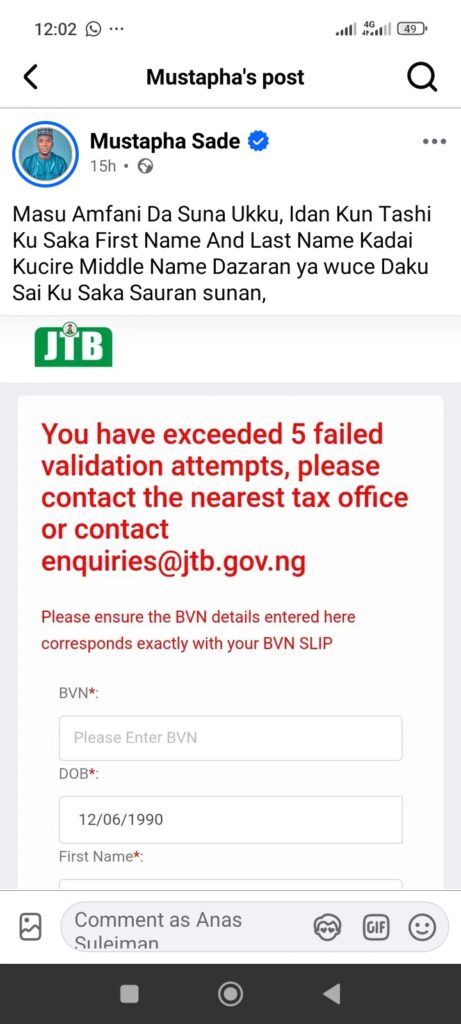
Many Nigerians registering for a Tax Identification Number (TIN) have reported challenges on the Joint Tax Board (JTB) portal, particularly at the BVN validation stage. BVN validation is a critical part of the TIN registration process, as applicants are required to input their personal details correctly before they can proceed.
During this stage, applicants must provide specific information, including their Bank Verification Number (BVN), date of birth, first name, and surname (last name). These details are cross-checked automatically with the BVN records available to the system. If the information supplied does not match exactly with what is on the applicant’s BVN registration, the portal will flag an error.
One common issue encountered is related to the arrangement of names. Applicants should note that the first name and last name entered on the JTB portal must strictly follow the same order and spelling as recorded during BVN registration with their bank. Any disparity such as switching first and last names, omitting a middle name, or using a different spelling can result in a validation failure.
The portal allows only five validation attempts. If an applicant exceeds this limit, the system automatically locks further attempts and displays the message:
“You have exceeded 5 validation attempts, please contact the nearest tax office or contact enquiries@jtb.gov.ng.”
To avoid falling victim to this issue, applicants are strongly advised to double-check their details before submitting them on the portal. Visiting your bank to obtain a printed BVN slip is highly recommended, as it shows the exact arrangement and spelling of your names and other details.
For applicants who have already exceeded the validation attempts, the following steps can help resolve the issue:
1. Wait and Retry: In some cases, waiting for a few hours or days before trying again with the correct information may help. However, ensure that the details you enter match your BVN records exactly.
2. Contact the Joint Tax Board (JTB): If the problem persists, send a formal email to the JTB requesting assistance. It is very important that all information provided in the email is accurate, as resubmitting incorrect details will not resolve the issue.
The official JTB enquiry email address is: contactus@jtb.gov.ng. When sending your email, ensure that you include a clear subject line and provide all required details.
Sample Email Subject: Request to Reset BVN Validation Attempts for TIN Registration
Dear Joint Tax Board Support Team,
I encountered an “Exceeded validation attempts” error during BVN verification while registering for my Individual TIN, despite entering correct BVN details.
Kindly assist in resetting/unlocking my BVN validation attempts so I can proceed.
Below are my correct details:
BVN: ……
Date of Birth: ……
First Name: ……
Last Name: ……
Middle Name: ……
Phone number: …..
Thank you for your support.
Warm regards,
[Your Full Name]
[Phone Number]
[Email Address]
JTB Portal: https://tin.jtb.gov.ng
READ ALSO: Apply for the Agrifood Leadership Education Programme (ALEP) 2026